Quickstart
pystac-client can be used as either a Command Line Interface (CLI) or a Python library.
CLI
Use the CLI to quickly make searches and output or save the results.
The --matched switch performs a search with limit=1 so does not get
any Items, but gets the total number of matches which will be output to
the screen (if supported by the STAC API).
$ stac-client search https://earth-search.aws.element84.com/v0 -c sentinel-s2-l2a-cogs --bbox -72.5 40.5 -72 41 --matched
2179 items matched
If the same URL is to be used over and over, define an environment variable to be used in the CLI call:
$ export STAC_API_URL=https://earth-search.aws.element84.com/v0
$ stac-client search ${STAC_API_URL} -c sentinel-s2-l2a-cogs --bbox -72.5 40.5 -72 41 --datetime 2020-01-01/2020-01-31 --matched
48 items matched
Without the --matched switch, all items will be fetched, paginating
if necessary. If the --max-items switch is provided it will stop
paging once that many items has been retrieved. It then prints all items
to stdout as an ItemCollection. This can be useful to pipe output to
another process such as
stac-terminal,
geojsonio-cli, or
jq.
$ stac-client search ${STAC_API_URL} -c sentinel-s2-l2a-cogs --bbox -72.5 40.5 -72 41 --datetime 2020-01-01/2020-01-31 | stacterm cal --label platform
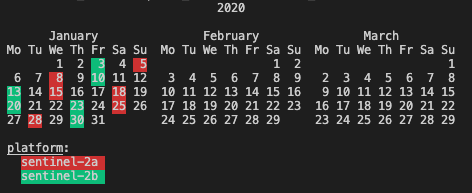
If the --save switch is provided instead, the results will not be
output to stdout, but instead will be saved to the specified file.
$ stac-client search ${STAC_API_URL} -c sentinel-s2-l2a-cogs --bbox -72.5 40.5 -72 41 --datetime 2020-01-01/2020-01-31 --save items.json
If the Catalog supports the Query
extension,
any Item property can also be included in the search. Rather than
requiring the JSON syntax the Query extension uses, pystac-client uses a
simpler syntax that it will translate to the JSON equivalent. Note
however that when the simple syntax is used it sends all property values
to the server as strings, except for gsd which it casts to
float. This means that if there are extensions in use with numeric
properties these will be sent as strings. Some servers may automatically
cast this to the appropriate data type, others may not.
The query filter will also accept complete JSON as per the specification.
<property><operator><value>

where operator is one of `>=`, `<=`, `>`, `<`, `=`

Examples:
eo:cloud_cover<10
created=2021-01-06
view:sun_elevation<20
Any number of properties can be included, and each can be included more than once to use additional operators.
$ stac-client search ${STAC_API_URL} -c sentinel-s2-l2a-cogs --bbox -72.5 40.5 -72 41 --datetime 2020-01-01/2020-01-31 -q "eo:cloud_cover<10" --matched
10 items matched
$ stac-client search ${STAC_API_URL} -c sentinel-s2-l2a-cogs --bbox -72.5 40.5 -72 41 --datetime 2020-01-01/2020-01-31 -q "eo:cloud_cover<10" "eo:cloud_cover>5" --matched
4 items matched
Python
To use the Python library, first a Client instance is created for a specific STAC API (use the root URL)
from pystac_client import Client

catalog = Client.open("https://earth-search.aws.element84.com/v0")
Create a search
mysearch = catalog.search(collections=['sentinel-s2-l2a-cogs'], bbox=[-72.5,40.5,-72,41], max_items=10)
print(f"{mysearch.matched()} items found")
The get_items function returns an iterator for looping through he
returned items.
for item in mysearch.get_items():
    print(item.id)
To get all of Items from a search as a single PySTAC
ItemCollection
use the get_all_items function. The ItemCollection can then be
saved as a GeoJSON FeatureCollection.
Save all found items as a single FeatureCollection
items = mysearch.get_all_items()
items.save_object('items.json')